Making an SVG Icon with TeX and TikZ
I could not decide what favicon to use for this site, then realized I could make one with TikZ, a tool I already use often. This is a memo on the process of drawing the icon and exporting it as SVG.

After launching this site, I kept postponing the favicon. I had a temporary icon, but it felt too generic.
I do not usually draw icons, I do not have Illustrator, and starting from zero in a new design app felt heavy. Then I realized: I already use TeX and TikZ. Why not make a vector icon with those?
This article is a memo about:
- what kind of icon I wanted,
- how I assembled the shape in TikZ,
- how I exported it to SVG.
Target Image
Because I was using TeX and TikZ, I wanted a geometric, mathematical-looking icon.
The conditions were:
- Simple shape: favicons are displayed very small, so the shape must not collapse.
- Few colors: one theme color plus a little brightness variation.
- Made with TikZ only: no external image assets.
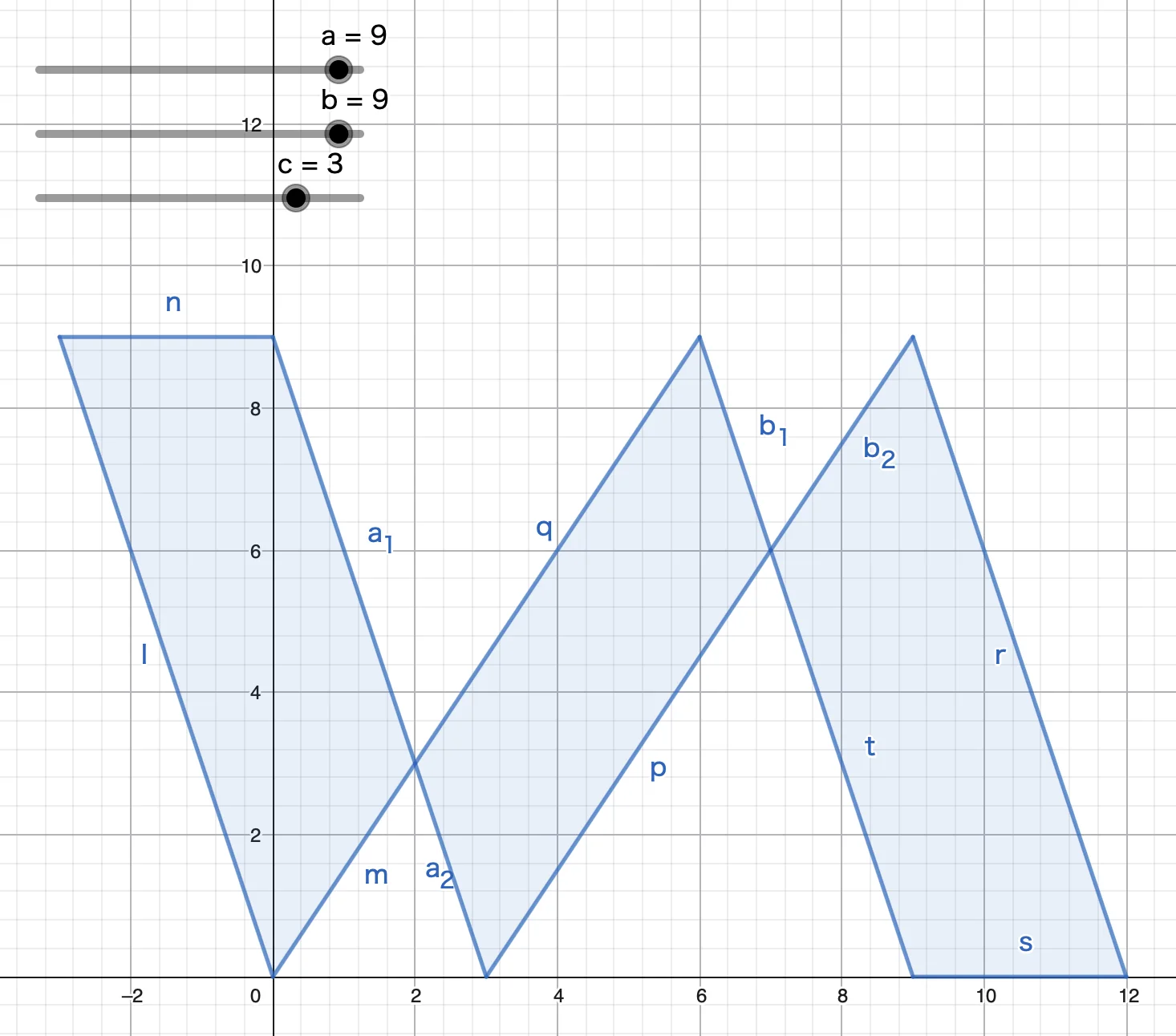
I started from a slanted parallelogram and tried to make a shape that suggests both N and W.
TikZ Implementation
First, I placed points and filled polygons directly.
\begin{tikzpicture}[>=stealth, scale=0.8]
\def\height{9}
\def\width{9}
\def\diff{\height/3}

\def\Rate{100}
\def\opacity{1}
\definecolor{myC}{HTML}{0044FF}
\coordinate (LU) at (-\diff, \height);
\coordinate (LD) at (0, 0);
\coordinate (RD) at (\width, 0);
\coordinate (RU) at (\width-\diff, \height);

\coordinate (LUd) at (0, \height);
\coordinate (LDd) at (\diff, 0);
\coordinate (RDd) at (\width+\diff, 0);
\coordinate (RUd) at (\width, \height);

\coordinate (LP) at (intersection of LD--RU and LUd--LDd);
\coordinate (RP) at (intersection of LDd--RUd and RU--RD);
\fill[fill=myC!\Rate, opacity=\opacity] (LP) -- (LDd) -- (RP) -- (RU) -- cycle;
\fill[fill=myC!\Rate, opacity=\opacity] (LU) -- (LUd) -- (LP) -- (LD) -- cycle;
\fill[fill=myC!\Rate, opacity=\opacity] (RP) -- (RUd) -- (RDd) -- (RD) -- cycle;
\end{tikzpicture}
The useful TikZ details here are:
\coordinatedefines named points.intersection of A--B and C--Dfinds an intersection point.\definecolorlets you define colors from hex values.myColor!50!blackmixes colors.
Refinement
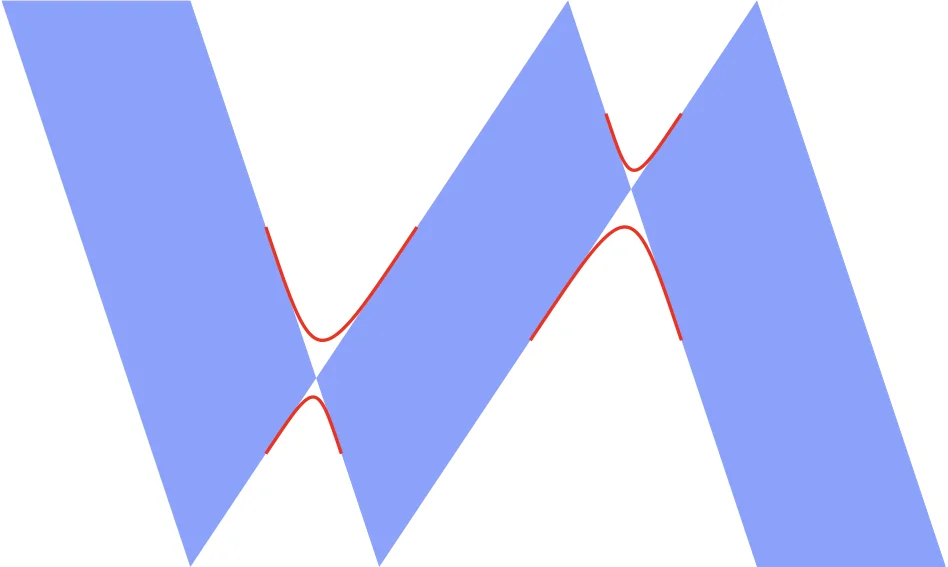
The first version was too flat, so I adjusted the shape and added color variation. The goal was not to make a complex logo, but to make the small favicon readable.
Adjusting Color
For a favicon, color contrast matters more than subtle detail. I tried a few blue tones and chose a version that stayed recognizable at small sizes.
Exporting to SVG
TikZ can be compiled and converted into an SVG. My flow was:
- write the TikZ source,
- compile it,
- convert the output to SVG,
- adjust
widthandheightfor favicon use.
Actual Script
#!/usr/bin/env bash
set -euo pipefail

OUT_SVG="favicon.svg"

# Run from the project root.
# Compile the TeX source and convert it to SVG with your preferred toolchain.

# For favicon use, set width and height to 32 while keeping the viewBox.
sed -i '' 's/width="[^"]*" height="[^"]*"/width="32" height="32"/' "$OUT_SVG"
On macOS, sed -i '' is required. On GNU sed, the command would be slightly different:
sed -i 's/width="[^"]*" height="[^"]*"/width="32" height="32"/' "$OUT_SVG"Closing
I was surprised that TeX and TikZ were enough to make a usable icon. TikZ is especially nice for this kind of geometric design because intersection points and coordinate calculations are easy to express.
If you already use TeX, playing with TikZ for logos or icons can be a fun small design exercise.
Related items
-
I Became a Swift Student Challenge 2026 Winner
I was selected as a Winner in Apple's Swift Student Challenge 2026. This article summarizes the submitted app, what I focused on while developing it, how I approached Apple's evaluation criteria, and advice for future applicants. -
I Won the Grand Prize at the MFG GPU Programming Contest 2025
MFG Challenge is a contest for creating image filters with a GPU programming language. I had touched GPU programming before, but starting from a new language was still challenging. This article focuses on the filter I made and the ideas behind it.