I Became a Swift Student Challenge 2026 Winner
I was selected as a Winner in Apple's Swift Student Challenge 2026. This article summarizes the submitted app, what I focused on while developing it, how I approached Apple's evaluation criteria, and advice for future applicants.
I was selected as a Winner in Apple’s Swift Student Challenge 2026.
This article summarizes the app I submitted, what I focused on while developing it, how I designed the work around Apple’s evaluation criteria, and advice for people who want to apply to Swift Student Challenge in the future.
I hope it helps if you are wondering:
- “I am interested in Swift Student Challenge, but I do not know what kind of work to make.”
- “I want to know how to communicate not only technical skill, but also an idea and a story.”
- “I want to know what to pay attention to during development if I want to be selected as a Winner.”
What Is Swift Student Challenge?
Swift Student Challenge is Apple’s annual programming contest for students around the world. Applicants create a work in the App Playground format using Swift and submit it to Apple.
What clearly separates this challenge from many other programming contests is that you are not simply expected to make a complicated or technically flashy app.
Main Requirements
- Create an App Playground that can be experienced within three minutes
- Make it work without a network connection (offline)
- Include all resources used by the app locally
- Keep the ZIP file size to 25 MB or less
“25 MB!?” You might think it should be 25 GB, but it is 25 MB. And it still has to work offline. In other words, if you try to include a local AI model, the size limit becomes very difficult. Large image and audio assets are also hard to include freely.
To me, this felt like Apple was saying: “Do not win by piling on technology. Win through idea and experience design.” Rather than competing only on how complex your code is, the idea, the experience design, the social meaning, and how understandable the work is for the user become very important.
Apple’s Evaluation Criteria
Apple’s Swift Student Challenge page says Winners are selected based on innovation, creativity, social impact, or inclusivity.
- Innovation = novelty
- Creativity = expressive approach
- Social Impact = whose problem the app addresses
- Inclusivity = whether many kinds of people can use and understand it
The parts that are hard to fully explain through the app experience itself can be described in the submission essays. Also, because the app must be experienceable within three minutes, it is important to think about how to fit that value into such a short time.
Being Selected as a Swift Student Challenge 2026 Winner
The App Playground I submitted was selected as a Winner in Swift Student Challenge 2026.
Apparently, this contest may not send result emails, or at least I did not receive one. You seem to need to check the result on the website yourself. Since no result email arrived, I did not even think I had failed; I had almost completely forgotten about it. Then AirPods Max suddenly arrived as the prize, and that was when I first realized I had been selected as a Winner. I was very surprised.
I honestly did not expect to be selected, so I was really happy. I have long been working on the theme of turning complex, hard-to-see information into forms that can be understood intuitively, and it felt meaningful that this direction was recognized on Apple’s platform.
Swift Student Challenge feels less like a simple programming contest and more like a place to express your own idea as an app.
- Why are you making it?
- Who is it for?
- What kind of understanding or emotional shift should it create for the person who touches it?
That is what makes this challenge interesting.
Submitted Work: SemanticTower
The work I submitted is called SemanticTower.
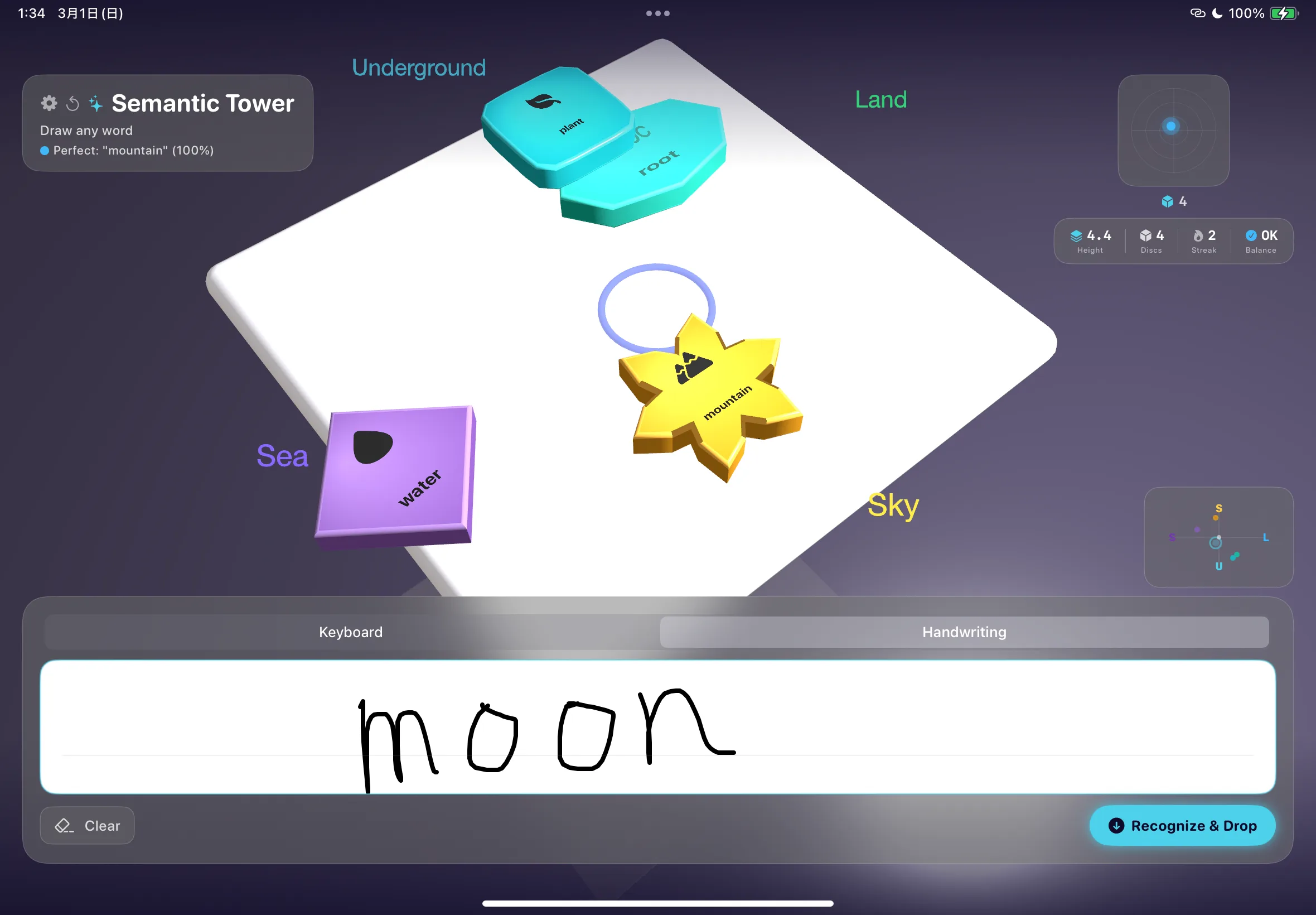
SemanticTower is an App Playground where users can experience the “semantic closeness” of words as positions in 3D space and as physical stability.
In everyday life, we usually treat words as strings. Words like “cat,” “dog,” “apple,” and “school” look like nothing more than sequences of letters on a screen.
In natural language processing and AI, however, words are represented as vectors. In other words, the meanings of words are handled as positional relationships inside a mathematical space. This “semantic space” is very important for understanding modern AI, but for many people, word vectors and embeddings are invisible and abstract concepts.
How It Works and Feels
SemanticTower visualizes this invisible “distance of meaning” using SceneKit’s 3D space and physics simulation.
- The user chooses a word and stacks it like part of a tower.
- Words that are semantically close tend to be more stable, while forcing semantically distant words together makes the balance easier to lose.
- For example, “cat” and “dog” are semantically close and are placed in similar areas, but combining words with distant meanings, such as “cat” and “democracy,” changes the stability of the tower.
SemanticTower is an app where users understand word meanings not by “reading” them, but through bodily sensations like stacking, collapsing, and supporting.
Why I Made This Work
The background of this work comes from my own interests. I have been interested in transforming complex, hard-to-see information into forms that can be understood intuitively.
In an earlier project, LLMView, I visualized what kinds of words a large language model considers behind the scenes when generating text, such as attention and probabilities. LLMs can generate natural sentences, but what happens inside them is a very hard-to-see black box. To understand AI more deeply, we need to understand not only model outputs, but also the mechanisms behind those outputs.
So for this Swift Student Challenge, instead of recreating an LLM itself, I wanted to make the more fundamental idea “words are handled as vectors” something anyone could touch.
What I especially cared about was making it enjoyable even for people who are not familiar with mathematics or computer science. Terms like “word vectors,” “natural language processing,” and “embeddings” can sound difficult, but if the idea is turned into a game-like experience, people can understand it intuitively without knowing the terminology. This idea of turning invisible mathematics into something playable is at the center of SemanticTower.
What I Focused on During Development
During development, I focused on creating an experience that communicates quickly, rather than increasing the number of features.
When building an app, it is tempting to add rankings, detailed settings screens, online features, and many other things. But if judges are experiencing the work in a short amount of time, the app needs to communicate “what kind of app this is” and “what makes it interesting” within the first few dozen seconds.
For that reason, I narrowed SemanticTower’s experience down quite a lot. The basic action is simply: “write a word, think about semantic closeness, and stack the disc where you are aiming.”
I also cared about making it feel natural on Apple’s platform, so I combined the following technologies:
- SwiftUI for a simple UI
- SceneKit for 3D expression
- Natural Language framework (NLEmbedding) for natural language processing
Rather than merely making “an app written in Swift,” I wanted to create an experience that only works because it is built with Apple’s technologies.
How I Thought About Apple’s Evaluation Criteria
I tried not to compete on technical skill alone. Instead, I cared about what the work communicates as a whole. I mainly thought about the following four viewpoints.
1. Innovation
The novelty of SemanticTower is that it expresses semantic closeness between words not as a graph or table, but as a physical game. Visualizing word vectors itself exists in research and educational contexts, but many examples are specialized diagrams such as 2D plots. I converted that into the rule of stacking a tower, so users could understand semantic space through game-like success and failure.
2. Creativity
I cared about translating “meaning” into other sensations such as “weight” and “position.” Instead of explaining the abstract concept directly, I brought it into something closer to play, so users could become familiar with the world of natural language processing more naturally.
3. Social Impact
I wanted to address the problem that many fundamental concepts in AI and information science are hard to see. As AI becomes more common in society, I wanted this app to become an intuitive entry point for middle and high school students or programming beginners to touch the idea that “words are handled as vectors,” which underlies search and chat AI.
4. Inclusivity
I made the central experience simple with accessibility in mind. By showing only the necessary information, I tried to make the structure easy to follow even for first-time users. Even people who are not comfortable with numbers can intuitively feel relationships between meanings by watching whether the tower becomes stable.
What I Focused on in the Submission Form
In Swift Student Challenge, the written submission, including English essays, is very important. You need to supplement the app with essays of up to 200 words for each item, explaining the thoughts and problem awareness behind the work.
Main Submission Items
- App name / three screenshots
- The problem the app tries to solve / who it helps
- How accessibility was considered
- Technologies used and why they were chosen
- Whether AI tools were used / community contribution, etc.
Instead of simply listing technology names, I tried to write them not as explanations of technology, but as explanations of the experience. For example, based on what I actually wrote:
- SceneKit: not simply for 3D rendering, but to let users experience semantic distance as physical stability.
- NLEmbedding: to handle semantic vectors within the 25 MB limit without using an external API or huge model.
- Vision: to let users bring their own words into the app through handwriting.
- AVAudioEngine: to generate sound effects programmatically without including audio files, reducing file size.
Connecting My Experience to the Work
In the submission form, I connected my own experiences to the work and shaped them into a story.
In my case, from my experience teaching mathematics at a cram school, I had a strong feeling that abstract concepts become powerful when they can be understood intuitively as structures. I explained that I wanted to bring that feeling into the world of AI. By showing that the work was not a one-off idea, but an extension of my past interests and experiences, I think the persuasiveness of the project became much stronger.
The 25 MB Limit, Offline Operation, and AI Tool Use
Approach to the Size Limit
The 2026 requirement, “maximum 25 MB as a ZIP file and offline operation,” is a strict constraint for AI-related apps. However, this time I turned it around by using Apple’s standard frameworks.
Instead of bundling a large external model, I used NLEmbedding. Instead of packing in many image and audio assets, I used Core Graphics and AVAudioEngine for code-based generation. The key is how to combine standard features well.
AI Tool Declaration
In the AI-use declaration field of the submission form, I honestly wrote that I had used AI tools.
Specifically, I explained that I used AI for repetitive work such as assigning categories, icons, shapes, and organizing data for many words. I also clearly separated the scope of use by writing that the concept of the work, game design, and the core implementation decisions connecting NLEmbedding to physics were all made by me.
What I Think Was Important for Passing
I do not know the official intent behind the judging criteria, but as one applicant, I felt the following five points were important.
- Be able to describe the theme of the work in one sentence
- For SemanticTower: “An app where users intuitively experience semantic closeness between words through 3D space and physics.” Once this sentence is clear, the work stops drifting.
- Use Apple’s technologies naturally
- Instead of cramming in technologies, build a relationship where “this technology was necessary to create this experience.”
- Create an experience that communicates within three minutes
- A dense flow where the user understands the operation in the first few dozen seconds and finishes with a changed understanding.
- Treat the submission essay as part of the work
- Explain why you made it, and connect it to your own experiences. In my case, that meant teaching at a cram school and developing LLMView.
- Make a small but complete experience
- Rather than an unfinished app with many features, I think completeness matters: focused functionality, physical behavior, visuals, and sound that work consistently without bugs.
Reflections: For Future Applicants
My biggest regret is that I did not leave enough time in my development schedule.
Until two weeks before the deadline, which was the evening of March 1 in Japan time, I was packed with university exams and other commitments. I had written down the concept in notes, but I ended up implementing everything intensely over those final two weeks. Because of that, I did not have enough time to polish the finer details of the UI, and I still wish I could have made it more stylish.
Also, on the submission day, I had a part-time job. After that, while sitting in the passenger seat during an overnight drive my friends invited me on, I desperately fought with ChatGPT and DeepL to write the English submission form. I ended up getting seriously carsick, and my friends had to take breaks for me and lend me charging cables. I caused them a lot of trouble, and I am very grateful to them.
Here are some photos from that time.


In particular, there are two things I now think I should have done earlier:
- Test on another device: I only checked the app on my iPad and submitted it with a “it will probably be fine” mindset, but I should have extracted the ZIP on another environment and checked whether it launched correctly.
- Prepare the English essays early: The 200-word limit is shorter than it sounds. Cutting text takes time, so it helps to practice narrowing the points down like a product pitch.
Closing
In the end, I think a strong work is one that is deeply connected to your own interests and experiences.
Rather than only trying to make something that seems likely to appeal to Apple, try starting from something close to you: study, daily life, hobbies, family, accessibility, or a problem you genuinely feel around you. Turning that into a three-minute Playground is the real joy of Swift Student Challenge.
With this award as encouragement, I want to keep challenging myself to turn complex, hard-to-see mechanisms into forms that people can touch and play with. For everyone planning to apply, I hope you enjoy the process and value not only technical skill, but also your own problem awareness and experience design.
Related items
-
Making an SVG Icon with TeX and TikZ
I could not decide what favicon to use for this site, then realized I could make one with TikZ, a tool I already use often. This is a memo on the process of drawing the icon and exporting it as SVG. -
I Won the Grand Prize at the MFG GPU Programming Contest 2025
MFG Challenge is a contest for creating image filters with a GPU programming language. I had touched GPU programming before, but starting from a new language was still challenging. This article focuses on the filter I made and the ideas behind it.